







Skip to main content
Search
For a free email forwarding service, Vetta recommends the use of ImprovMX (www.improvmx.com)
The process below involves pointing your domain name to ImprovMX for mail, and setting an email address for any and all email to be forwarded to.
- Login to the client area at https://portal.vetta.online
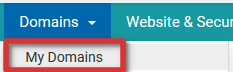
- Under the “Domains” link, click “My Domains”
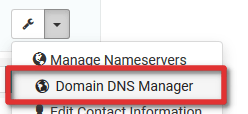
- Click the small arrow next to the domain name you with to use for email forwarding and click “Domain DNS Manager”
Note: If you receive an error saying this is disabled, you’ll need to Enable DNS Management - Structure a DNS entry to look like the below

- Save the DNS Zone
- Navigate to www.improvmx.com
- Enter your domain name, and the email address you want email to be forwarded to and click “Verify and start forwarding”
- You’re all done! Email to any recipient at your domain name (e.g. [email protected]) will now be forwarded to the email address specified







While I am interested in your domain name services, I’d just like to point out that calling the ability to set MX records, email forwarding, is false advertising, because email forwarding involves the email actually going through your mail server, not just the MX records identifying where the email is to go.
Hi Richard, and thanks for your comment.
I completely agree with this. Currently, we don’t offer an email forwarding service ourselves as part of our domain name offering, which is why you don’t see this in the features list on our Domain Names page (https://www.vetta.online/oldsite/domains). This is currently however a feature request, and this article serves as a fix for providing a free email forwarding service with any domain name, not just from us.
Once we do complete out intention of offering an email forwarding service as part of our domain name offering, this article will likely be archived.
Hope this helps clear this up.
I use improvmx, forwardemail.net and emailforward.mx. All of them are great.