







A customer says your invoice never arrived. Your team swears it was sent. A day later, someone spots a fake message pretending to be from your domain, asking for urgent payment details. That is usually when businesses start asking, what is SPF, DKIM and DMARC?
These three standards sit quietly in the background of business email, but they do a very visible job. They help receiving servers decide whether a message claiming to be from your domain is genuine, altered, or suspicious. If your business relies on email for quotes, invoices, customer support, bookings, or internal approvals, getting them right is not a nice-to-have. It is basic operational protection.
What is SPF, DKIM and DMARC in plain English?
SPF, DKIM and DMARC are email authentication standards. They work together, not as substitutes for one another.
SPF tells the world which servers are allowed to send email for your domain. DKIM adds a digital signature to prove the message was authorised and has not been tampered with in transit. DMARC sits above both and tells receiving servers what to do if a message fails those checks. It also gives you reporting, so you can see who is sending email using your domain.
Used together, they reduce domain spoofing, improve deliverability, and give you more control over your email reputation. Used badly, they can block legitimate email or leave gaps attackers can exploit. That is why setup needs care.
SPF: who is allowed to send on your behalf?
SPF stands for Sender Policy Framework. It is a DNS record that lists the mail servers permitted to send messages from your domain.
Think of SPF as a published guest list. When an email arrives claiming to be from your business, the receiving server checks whether the sending server is on that list. If it is, SPF passes. If not, SPF fails or soft fails depending on your record.
That sounds simple, but most businesses do not send email from just one place. You might use Microsoft 365 or Google Workspace for staff email, a website contact form through your hosting provider, a CRM for marketing, an accounting platform for invoices, and a helpdesk tool for customer replies. Every legitimate sender needs to be accounted for.
This is where problems start. SPF has a lookup limit, and messy records are common. If you keep adding third-party services without reviewing the record properly, you can end up with an invalid SPF policy or one that misses a genuine sender. The result is unreliable delivery and support teams chasing ghosts.
SPF also has an important limitation. On its own, it does not always align neatly with the domain people actually see in the From address. That is one reason SPF alone is not enough.
DKIM: has the message been altered?
DKIM stands for DomainKeys Identified Mail. It attaches a cryptographic signature to outgoing email. The receiving server checks that signature against a public key stored in your DNS.
If the signature matches, two things are established. First, the message was authorised by a system with access to the private key. Second, the signed parts of the message have not been changed in transit.
We've got your back
That matters because spoofed email is not always obvious. Attackers often send convincing messages that appear to come from a trusted domain. DKIM helps receiving systems distinguish between authorised mail and messages that only look legitimate on the surface.
DKIM is generally stronger than SPF when messages are forwarded, because forwarding can break SPF checks but often leaves DKIM intact. Even so, DKIM setup still needs proper management. Different services may use different selectors, keys need to be published correctly, and older or poorly configured systems can cause intermittent failures.
For a busy business, the practical benefit is trust. If your invoicing system, support platform, and staff email all sign messages correctly, you are less likely to have legitimate email treated as suspicious.
DMARC: the policy and reporting layer
DMARC stands for Domain-based Message Authentication, Reporting and Conformance. It builds on SPF and DKIM by adding two things SPF and DKIM do not provide on their own: alignment and policy.
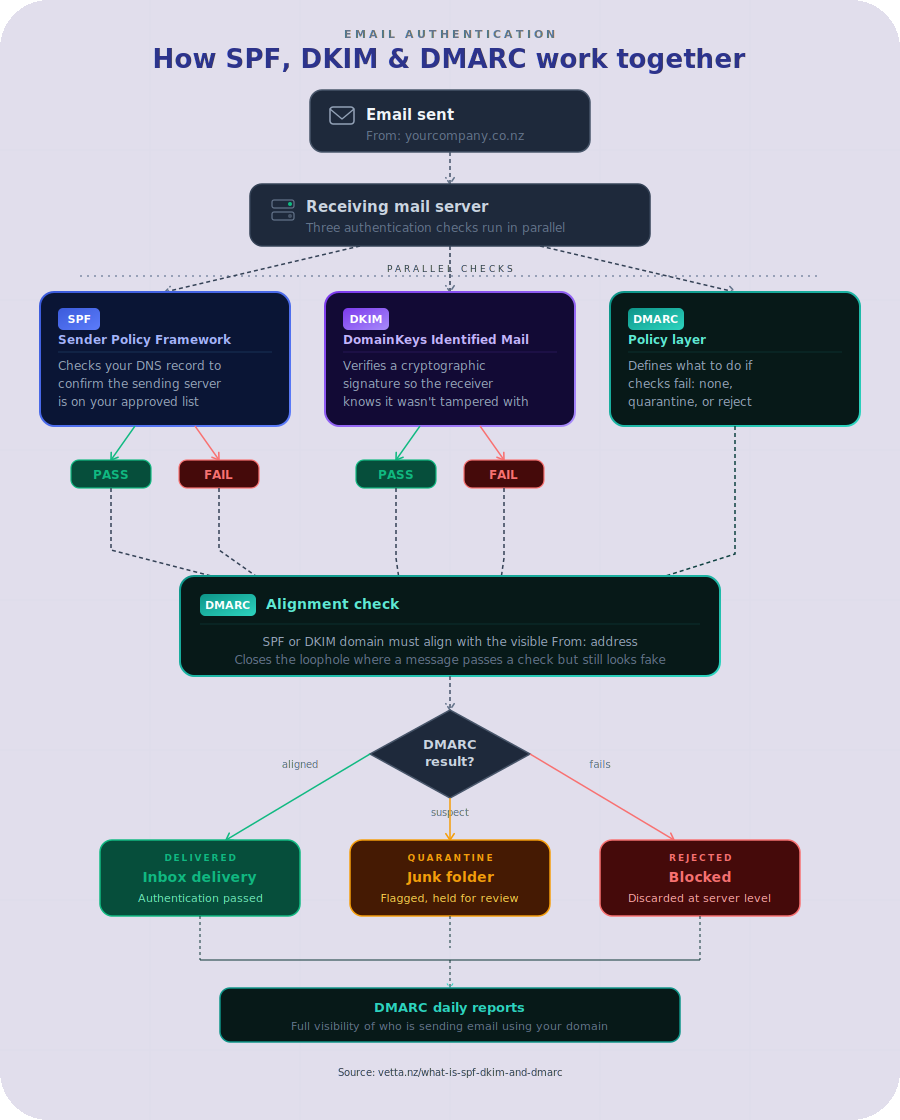
Alignment means the domain used in SPF and or DKIM must match, or closely match, the domain in the visible From address. That closes a common loophole where a message technically passes a check but still is not really from the domain the recipient thinks it is.
Policy tells receiving servers what action to take if a message fails DMARC. You can set it to do nothing, quarantine the message, or reject it outright.
DMARC also generates reports. These reports show which servers are sending mail on behalf of your domain and whether those messages are passing authentication. That visibility is one of DMARC’s biggest strengths. It helps you find legitimate systems you forgot about, as well as abuse you did not know was happening.
For many organisations, DMARC is the point where email security shifts from guesswork to control.
How SPF, DKIM and DMARC work together
The easiest way to think about it is this.
SPF checks whether the sender is on the approved list. DKIM checks whether the message carries a valid signature. DMARC checks whether those results align with the domain in the From address and then enforces your policy.
If you only publish SPF, you leave gaps. If you only enable DKIM, you miss policy control. If you set up DMARC without properly configuring the underlying senders, you can block genuine business email.
The value comes from the combination. Together, they help protect your domain from impersonation and give receiving systems confidence that your messages are legitimate.
Visual representation
Why this matters for SMEs
For smaller and mid-sized businesses, email is still mission-critical. It carries orders, approvals, customer communication, supplier updates, payment requests and password resets. If attackers can impersonate your domain, the damage is not only technical. It is operational and reputational.
A spoofed email can trigger fraud, confuse customers, or derail a supplier relationship. Even when no direct loss occurs, time gets wasted. Staff investigate delivery issues, customers question legitimacy, and internal IT tries to trace which platform sent what.
There is also the deliverability side. Large email providers are increasingly strict about authentication. If your domain has weak or inconsistent records, genuine messages are more likely to land in junk folders or face stricter filtering. For businesses that depend on prompt communication, that is a real cost.
Common mistakes that cause trouble
The most common mistake is treating SPF, DKIM and DMARC as a one-off setup. In reality, your email environment changes over time. New software gets added, websites move hosts, marketing tools are replaced, and old services are forgotten but still sending messages.
Another mistake is publishing a DMARC policy that is too aggressive too early. Going straight to reject without understanding your sending landscape can stop legitimate email from leaving the business. A staged approach is safer. Monitor first, identify all valid senders, fix alignment issues, then tighten enforcement.
It is also common to have multiple providers involved with no single owner. One supplier manages Microsoft 365, another hosts the website, someone else set up the CRM, and no one has a complete view of DNS. That fragmentation is exactly where misconfiguration thrives.
What good setup looks like
Good setup is not just about having records in DNS. It means your records reflect the systems you actually use, your legitimate services are aligned properly, and your DMARC policy is deliberate rather than guessed.
In practice, that usually starts with an audit. Identify every platform that sends email using your domain. Check whether each one uses SPF, DKIM, or both. Review DNS for duplication, errors, and unnecessary entries. Then publish DMARC in monitoring mode so you can study the reporting before moving to quarantine or reject.
This is also where having one accountable technology partner helps. When email, hosting, security and DNS are handled in silos, issues bounce between vendors. When the environment is viewed as one connected service, it is much easier to protect it properly and keep it working.
Does every business need DMARC?
Strictly speaking, not every domain needs the same level of enforcement on day one. It depends on how the domain is used, what platforms send from it, and how much impersonation risk the business carries.
But if your domain is used for customer-facing communication, billing, staff email or transactional messages, DMARC is hard to ignore. Attackers do not reserve spoofing for large enterprises. Smaller firms are often targeted because controls are lighter and teams are busier.
For that reason, the better question is not whether you need it, but how quickly you can put it in place without disrupting valid email.
A practical way to approach it
Start with visibility. Confirm who sends email for your domain and who has access to DNS. Then validate SPF, enable DKIM on each supported platform, and publish a DMARC record with reporting enabled. Watch the reports, clean up anything unexpected, and only then move towards stronger enforcement.
If that sounds fiddly, it is. Email authentication is one of those areas where small DNS errors can create outsized business problems. The aim is not to make your setup clever. It is to make it dependable.
Technology should make life easier, not leave your team guessing whether messages arrived or whether your domain is being misused. SPF, DKIM and DMARC are not glamorous, but they are part of the groundwork that keeps a business trusted, reachable and protected. Done properly, they let email get on with its job while you get on with yours.





